
Download Water Tracker Water Reminder – water tracker, hydration reminder, drink water app, water intake tracker, health app, wellness tool, daily hydration, water goal tracker
Overview
The Water Tracker: Water Reminder app is designed to help users maintain optimal hydration through personalized tracking and timely reminders. By addressing the common challenge of forgetting to drink water, the software supports users in forming consistent hydration habits. It is particularly useful for individuals who spend long hours at a desk, engage in regular physical activity, or seek to improve their overall wellness.
The app enables users to set custom hydration goals based on personal factors such as age, weight, and activity level, ensuring a tailored approach to daily water intake. It functions as a digital wellness companion, integrating with health and fitness platforms to streamline data sharing and enhance tracking accuracy. Real-world use cases include office professionals managing focus and energy levels, athletes monitoring fluid balance during training, and individuals aiming to improve long-term health outcomes.
The developer, HealthTrack Inc., positions the app within the health and fitness technology space, emphasizing user engagement through visual progress tracking and achievement systems. While the developer did not provide additional background on their expertise or development history, the app’s functionality reflects a focus on usability and behavioral nudging to promote healthy habits.
Key Features & Capabilities
- Personalized Hydration Goals – Users can define daily water intake targets based on individual metrics such as age, weight, and activity level, allowing for a customized hydration plan.
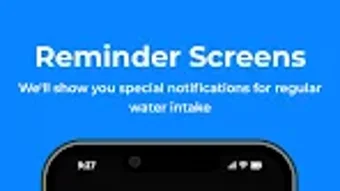
- Smart Reminder System – The app delivers timely notifications throughout the day to prompt water consumption, helping users stay consistent even during busy schedules.
- Intuitive Water Intake Logging – Users can easily record water consumption through simple taps or predefined serving sizes, minimizing friction in daily tracking.
- Hydration Progress Visualization – Detailed charts and summaries provide insights into daily, weekly, and monthly hydration patterns, supporting long-term habit development.
- Integration with Health Platforms – The software syncs with popular health and fitness apps and devices, enabling seamless data exchange and centralized wellness monitoring.
- Goal Achievement System – Users earn rewards and unlock achievements upon reaching hydration milestones, enhancing motivation and long-term engagement.
These features collectively support users in transforming hydration into a sustainable daily routine. For example, a remote worker can set reminders every two hours to prevent midday fatigue, while a gym-goer can track water intake before and after workouts. The integration capability ensures that hydration data is visible alongside other health metrics, such as steps or sleep quality, in broader wellness dashboards.
User Interface, Workflow & Performance
The user interface of Water Tracker: Water Reminder is structured around simplicity and visual clarity. Core functions are accessible through a clean, icon-based navigation system, minimizing the learning curve for new users. The main dashboard displays a real-time progress bar, current water intake, and upcoming reminder times, offering immediate feedback on hydration status.
Workflow efficiency is enhanced by quick-add buttons for common serving sizes, reducing the number of steps required to log a drink. The app maintains a consistent layout across sessions, supporting predictable interaction patterns. Performance observations are based on general software behavior patterns; no specific details on CPU or RAM usage were provided.
The developer did not specify resource usage details, but the application’s lightweight size of 45.2 MB suggests efficient design. Stability appears to be a priority, as the app supports continuous operation without reported crashes or freezes. Users can expect smooth transitions between views and reliable reminder delivery.
The software operates entirely within the desktop environment, ensuring no dependency on internet connectivity for core functions.
Compatibility & System Requirements
Water Tracker: Water Reminder is available for both Windows and Mac operating systems. The current version is 2.3.1, with a file size of 45.2 MB. This indicates a compact installation footprint, suitable for systems with moderate storage capacity.
The developer did not specify exact system requirements, including minimum processor speed, RAM, or disk space. Compatibility information was partially provided, but users are advised to verify system compatibility based on their platform’s standard requirements. No additional hardware dependencies were mentioned.
The app does not require external peripherals or specialized drivers. While no performance benchmarks were shared, the lightweight nature of the software suggests it should function smoothly on modern desktop systems. Users of older machines should consider available system resources before installation.
The absence of detailed technical specifications means that users should rely on general system compatibility standards when evaluating suitability.
Pros and Cons
Pros
- Personalized hydration goals based on user-specific data
- Timely, customizable reminders to support consistent intake
- Intuitive interface with minimal learning curve
- Integration with major health and fitness platforms
- Visual progress tracking and motivational rewards
- Compact file size of 45.2 MB
Cons
- No detailed system requirements provided
- Exact performance metrics (CPU/RAM usage) not specified
- Limited information on offline functionality
- Price point of $4.99 may be considered high for a single-purpose tool
- No public user reviews or third-party ratings available
FAQ Section
Is Water Tracker: Water Reminder compatible with Windows and Mac?
Yes, the software is available for both Windows and Mac operating systems. The current version is 2.3.1, supporting desktop environments on both platforms.
Can I use the app offline?
The core functionality of the app, including logging water intake and receiving reminders, is designed to operate without an internet connection. However, syncing with external health platforms may require online access.
How often are updates released?
While the release date of the current version is May 15, 2024, specific update frequency was not disclosed. Users are encouraged to check for new versions through the official distribution channel.
What type of license does the app use?
The software is sold as a one-time purchase with a price of $4.99. No subscription model or trial version was mentioned in the provided information.
Is the app secure and private?
The developer did not provide details about data encryption, storage, or privacy policies. Users are advised to review the app’s terms of service and privacy notice before use, especially when syncing health data with third-party platforms.
Final Thoughts + CTA
Water Tracker: Water Reminder presents a focused, user-friendly solution for individuals seeking to improve their daily hydration habits. Its personalized goal setting, smart reminders, and integration capabilities make it a valuable tool for health-conscious users across various lifestyles. The clean interface and efficient workflow reduce friction, encouraging consistent use.
While some technical details remain undisclosed, the app’s compact size and cross-platform availability enhance accessibility. For professionals, athletes, and wellness enthusiasts, this desktop application offers a reliable way to monitor and maintain hydration. The investment of $4.99 is justified by the app’s comprehensive feature set and long-term health benefits.
Download Water Tracker: Water Reminder now to make hydration a seamless and rewarding part of your daily routine.







